5 Components HR and Legal Need in a Lawyer Led AI Usage Policy
Adopt a tiered AI usage policy now: permit low-risk assistance with basic controls, require documented approval before anyone uses AI for high-impact decisions, and flatly prohibit feeding confidential or regulated data into public AI tools. Name one accountable executive today. Everything else, including the intake forms and sample clauses below, builds from that.
TL;DR:
Most AI policies should include clear risk tiers, explicit permitted and prohibited uses, and detailed data handling rules to prevent misuse and maintain compliance.
The scope must cover all individuals accessing systems, including vendors and contractors, with accountable officials designated for overseeing AI governance.
Data categories such as personally identifiable information, health records, and confidential trade secrets must never be entered into unvetted AI tools, with constant vigilance on vendor contract terms regarding data use and retention.
An effective approval process requires risk-based review tiers, detailed documentation, and regular re-evaluation, especially after model updates or configuration changes.
Implementing an operational AI inventory, fostering cross-functional oversight, and prioritizing enforcement and training efforts secure ongoing compliance and minimize legal exposure.
Chief Legal OfficeBuild AI Governance That WorksChief Legal Office helps technology companies organize legal work, manage risk, and prepare practical processes for responsible AI use.Explore Chief Legal Office
Table of Contents
What Should an AI Usage Policy Actually Cover?
Who Does the Policy Cover, and Who Gets to Decide?
What Data Can Never Go Into an AI Tool?
How Do You Decide What AI Use Needs Approval?
Who Tracks the AI Tools Your Company Actually Uses?
Does Using AI Change Your Employment-Law Obligations?
How Do You Roll Out an AI Usage Policy Company-Wide?
What Templates Should Be in Your Policy Toolkit?
Perspective From Chief Legal Office
Why Most AI Policies Fail Before They’re Even Signed
Get Help Building an AI Policy That Actually Works
Sources
FAQ
What Should an AI Usage Policy Actually Cover?
Most AI usage policies fail for the same reason most contracts fail: they’re written to sound thorough instead of to be used. A policy your marketing team can’t apply on a Tuesday afternoon while drafting ad copy isn’t a policy. It’s a PDF nobody opens.
A working policy needs five components, and skipping any one of them creates a gap someone will eventually find.
Purpose and scope. State plainly why the policy exists (to manage risk, not to slow people down) and define “AI” broadly enough to catch embedded tools, not just chatbots. NIST’s Playbook makes this point directly: if you define AI narrowly, employees will assume the copilot inside their CRM doesn’t count, and you’ll have a governance hole nobody notices until it matters.
Permitted uses with verification. Brainstorming, first drafts, code suggestions, internal research summaries. All fine, as long as a human checks the output before it goes anywhere important.
Prohibited uses, spelled out with examples. Not “use good judgment.” Say it: no entering client names into ChatGPT, no using AI to make final hiring decisions, no pasting contract terms into a public model to “clean up the language.”
Data handling rules. What can and can’t go into a prompt, what the vendor promises about training and retention, and how long outputs get kept.
A risk-tier model. Not every AI use carries the same stakes, and treating a spelling check the same as an AI-driven layoff decision either overregulates the harmless stuff or underregulates the dangerous stuff. Usually both.
Get these five right and you’ve built the skeleton. The muscle comes from the sections below.
Who Does the Policy Cover, and Who Gets to Decide?
Scope gaps are where policies quietly die. If your document only mentions “employees,” you’ve left contractors, consultants, and vendors free to do whatever they want with your data in a tool you’ve never vetted.
Cover everyone who touches your systems or your data: full-time staff, contractors, temporary workers, and any vendor with access to confidential information. For vendors specifically, the policy should require a signed acknowledgment or a contract clause, not a verbal assurance.
Decision rights need names attached, not job titles floating in the abstract.
An accountable executive (often general counsel, sometimes the CIO) who owns the policy and signs off on exceptions.
Tool owners responsible for each approved AI system and its ongoing performance.
Human reviewers who actually look at AI outputs before they become decisions, not just people who rubber-stamp them.
A cross-functional committee (legal, HR, IT, and a business-unit lead) that meets to review new tool requests and flag emerging risks.
Definitions matter more than most drafters assume. Define “AI,” “model,” “decision impact,” and “training data” in the document itself. Leave any of these undefined and someone will argue their use case falls outside policy on a technicality. Add clear escalation paths (who gets called when something goes wrong) and recordkeeping duties (who logs the approval, and where).
What Data Can Never Go Into an AI Tool?
Some data categories should never touch a public or unvetted AI system, full stop. Customer personally identifiable information, health records, attorney-client privileged communications, trade secrets, and anything covered by HIPAA or the Gramm-Leach-Bliley Act belong on a strict do-not-enter list. Publicize that list. Post it where employees actually work, not buried in page 40 of an employee handbook.
The harder problem is vendor contracts, because most companies never actually read them. The FTC has warned that AI companies need to honor the privacy and confidentiality commitments they make, and that customer or confidential data shouldn’t be used to train models without explicit contractual protection. That warning exists because it keeps happening: companies promise confidentiality in marketing copy, then permit broad data retention or reuse in the actual terms of service.
When you review a vendor’s contract, check for four things in this order:
Training-data reuse. Does the vendor have the right to use your prompts or outputs to train its models?
Retention period. How long does the vendor keep your data after the session ends, and can you force deletion?
Security posture. What certifications or audits back up their security claims (SOC 2, ISO 27001), and can you verify them?
Audit and deletion rights. Can you audit their practices, and do they guarantee deletion on request within a defined window?
Pro Tip: Never assume a tool labeled “enterprise” means your data won’t train the model. That label is marketing, not a legal guarantee. Read the actual data processing addendum, every time, even for tools you’ve used for years.
Push for a no-training clause, an explicit deletion obligation, breach notification within a set number of days, and audit rights in every vendor agreement that touches sensitive data. If a vendor doesn’t agree to those terms, that tells you something about how they treat your data when nobody’s watching.
How Do You Decide What AI Use Needs Approval?
Not every AI use deserves the same scrutiny, and the biggest mistake we see is a single-tier policy that either blocks everything (so employees route around it) or approves everything (so nothing gets caught).
A three-tier model works for most organizations:
Low risk: internal brainstorming, meeting summaries, first-draft copy. Light oversight, general permission, done.
Medium risk: AI-assisted research feeding into client work, code that touches production systems, automated customer responses. Requires a tool owner’s sign-off and periodic spot checks.
High risk: anything touching hiring, credit decisions, medical guidance, legal advice, or performance evaluations. Requires documented human review before the output affects a real person, with someone who has actual override authority, not just viewing rights.
NIST’s AI Risk Management Framework recommends exactly this kind of lifecycle discipline: inventory the tool, align its use with your data governance rules, test and validate it, then monitor it continuously rather than approving it once and forgetting about it.
For high-risk tools, your documentation needs four minimums: an intake form on file, bias and accuracy testing results, the reviewer’s name, and a retirement date for when the tool gets re-evaluated. Skip the retirement date and you’ll end up governing a tool version that changed six months ago without anyone noticing.
Who Tracks the AI Tools Your Company Actually Uses?
Almost every company underestimates how many AI tools are already running inside it. Someone in sales connected a scheduling bot. Someone in support turned on an AI chat widget. Nobody told legal.
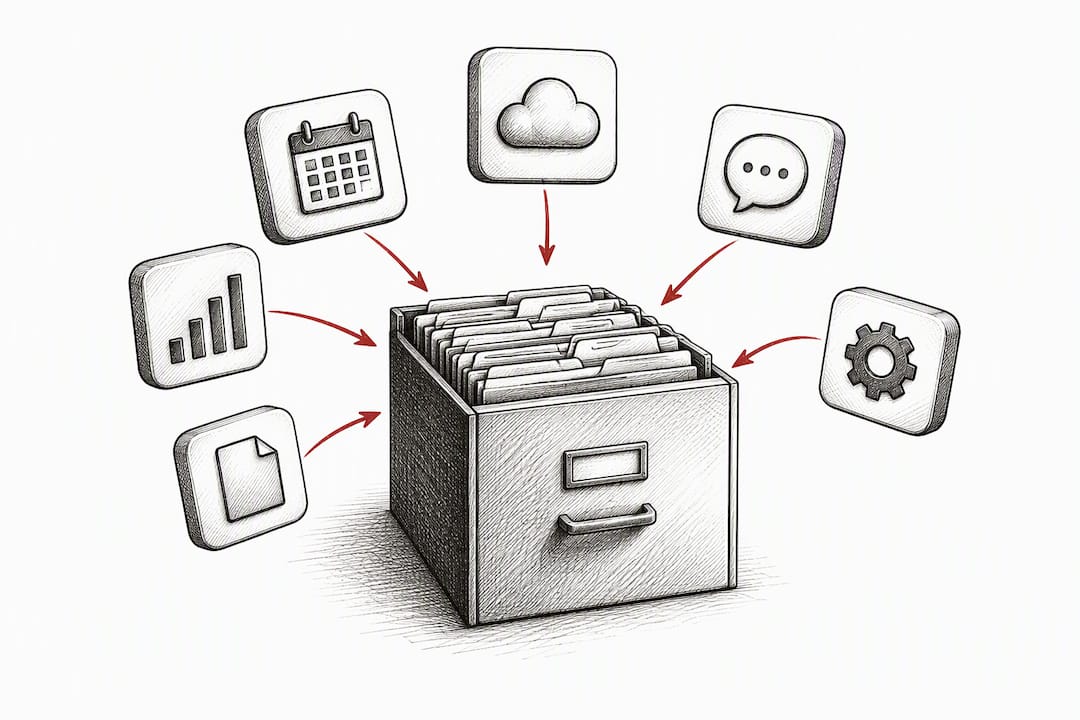
An inventory fixes this, but only if someone actually maintains it. Each entry needs: the tool’s owner, its business purpose, the vendor, who uses it, what data types it touches, whether it affects real decisions about people, retention practices, the date it was last validated, and a retirement or re-review date.
Procurement diligence needs to happen before a tool joins that list, not after, and consulting experts in building AI-native companies like those at Autonomousfirm can provide critical perspectives on vendor assessment and AI-safe product development. Before signing on with any new AI vendor, confirm:
Security attestations (SOC 2 Type II or equivalent) are current, not expired.
Data processing terms match what your legal team requires, not just what the sales rep promises.
The vendor discloses its model update policy, so you know when the tool underneath you changes.
Incident response obligations are spelled out, including who notifies whom and within what timeframe.
Change triggers matter as much as initial approval. A model update, a new plugin, or a major configuration change should automatically trigger re-testing and re-approval. Treating approval as a one-time event is how a compliant tool becomes a liability eighteen months later without anyone re-checking its work. Chief Legal Office’s AI governance work with clients almost always starts by building this inventory from scratch, because most companies genuinely don’t know what they’re running.
Does Using AI Change Your Employment-Law Obligations?
Here’s the principle that trips up more companies than anything else in this article: using an algorithm doesn’t transfer legal responsibility to the algorithm. The EEOC has been explicit that employers remain on the hook under Title VII and the ADA even when an AI tool made the recommendation. “The software flagged them” is not a defense.
That means anywhere AI touches hiring, firing, promotion, compensation, or discipline, you need documented human review with real evidence behind it, not a rubber stamp. NIST’s guidance on meaningful human-in-the-loop review is specific: the reviewer has to see the underlying evidence, understand what the tool can and can’t do, have actual authority to override its output, and document the decision. Anything less is ceremonial oversight, and it won’t hold up if challenged.
Require a named human reviewer with documented override authority for every high-impact AI decision.
Build in an alternative-assessment path for candidates who may be disadvantaged by AI-based screening, particularly disability accommodations.
Route accommodation requests through your existing HR process, not around it.
If you run applicant video interviews with AI analysis and you’re hiring in Illinois, the Artificial Intelligence Video Interview Act requires specific notice to applicants, an explanation of how the AI works, consent, limits on who the video can be shared with, and deletion within a set period on request, with demographic reporting required in certain cases. A single sentence in your policy that says “comply with applicable law” doesn’t satisfy any of that. You need an actual operational checklist that HR follows every time.
How Do You Roll Out an AI Usage Policy Company-Wide?
Writing the policy is the easy part. Getting people to follow it is where most rollouts stall.
Appoint the accountable executive and give them real authority to say no to a tool request.
Form the cross-functional review team (legal, HR, IT, one business-unit voice).
Build the AI inventory before you write another word of policy, so you know what you’re actually governing.
Classify every existing tool into the risk tiers described above.
Require intake approval for anything new going forward, using the form outlined in the next section.
Fix or exit non-compliant vendor contracts before they renew automatically.
Publish real examples of permitted and prohibited use, not abstract principles.
Train everyone, with role-specific scenarios that match how each team actually works.
Training only sticks when it uses realistic failure modes: a sales rep who almost pasted a client’s financials into a public model, an HR manager who almost let an AI tool auto-reject a resume without review. Refresh the training annually, and immediately after any incident.
Pro Tip: Build your incident-reporting definition wider than “data breach.” NIST’s Playbook flags hallucinated legal or financial claims, discriminatory outputs, prompt injection attacks, and vendor policy changes as reportable events too. If your incident form only asks about breaches, you’ll miss most of the real problems.
Review the whole policy annually at minimum, and immediately after any incident or a material regulatory change like a new state AI law.
What Templates Should Be in Your Policy Toolkit?
A usable intake form has to gate every deployment, not just document it after the fact. At minimum, capture: the proposed tool, business purpose, the specific data being entered, who receives the output, what decision it affects, the vendor’s retention and training practices, access controls, the assigned human reviewer, applicable jurisdiction, the fallback process if the tool fails, and how data gets deleted afterward.
For contracts, two clauses do most of the heavy lifting: a no-training, no-derivative-use restriction on your data, and an express deletion obligation with a defined timeline and audit rights attached.
Permitted vs. prohibited, side by side:
Use case | Permitted example | Prohibited example |
|---|---|---|
Internal writing | Drafting an internal memo outline | Drafting a termination letter without review |
Customer data | Summarizing public product reviews | Entering a customer’s account number into a public chatbot |
Hiring | Generating interview question ideas | Auto-rejecting candidates without human review |
Legal work | Summarizing a public statute for internal discussion | Relying on AI-drafted contract language without attorney review |
Smaller companies can use lighter versions of this language; heavier-regulated industries need stricter defaults and shorter review cycles.
Perspective From Chief Legal Office
Some dedicated legal teams handle this exact work for clients: standing up the intake form, negotiating the no-training rider into vendor contracts, running the risk-tiering exercise, and training HR on the scenarios that actually come up.
Three things any legal or HR team can do this week, without outside help: build a one-page intake form, add a no-training clause to your next vendor renewal, and run five real HR training scenarios instead of a generic slideshow. None of that requires a big budget. It requires someone owning it.
Why Most AI Policies Fail Before They’re Even Signed
The conventional advice on this topic treats an AI usage policy like a compliance checkbox: draft it, get it signed, file it away. That’s backwards. The research and the enforcement history both point the same direction: policies fail at the implementation gap, not the drafting stage. The FTC’s own enforcement pattern shows companies that had privacy language in their contracts but never checked whether vendors actually honored it.
What gets underestimated is how much of this is an operations problem disguised as a legal one. The EEOC won’t accept “the AI decided” as a defense, and neither will a court. That means the reviewer sign-off, the override authority, and the documentation trail matter more than the policy’s prose.
If you take one thing from this article, prioritize the intake form over the perfect policy language. A mediocre policy with a working intake gate catches more real risk than a beautifully written policy nobody consults before deploying a new tool.
— Amy Natasha Osteen
Get Help Building an AI Policy That Actually Works
Some legal service providers build AI governance the way an in-house legal department would. Instead of a generic template or a one-off consultation, clients receive senior in-house attorney support backed by a team who can draft intake forms, negotiate no-training clauses into vendor contracts, and train HR staff on real scenarios, not slideware.
If you’re still handling AI questions between meetings, or your outside counsel can answer individual questions but nobody owns the whole function, that’s the gap Chief Legal Office fills. The AI Governance & Privacy service covers the full lifecycle: policy drafting, vendor diligence, risk tiering, and ongoing monitoring as your tools change. Pricing runs from the Foundations plan at $1,000 per month up through Embedded Access and Strategic Growth, depending on how much ongoing legal support your team needs. Schedule a consult and get your AI policy gap assessed before your next vendor renewal, not after.
Sources
AI companies: uphold your privacy and confidentiality commitments — FTC
Artificial Intelligence Risk Management Framework: Generative Artificial Intelligence Profile — NIST
Public Act 101-0260 — Artificial Intelligence Video Interview Act (Illinois)
FAQ
What Is an Acceptable Use Policy for AI?
An acceptable use policy for AI defines what employees can and can’t do with AI tools at work, including which tools are approved, what data can be entered, and who reviews the output before it becomes a decision. It typically pairs permitted-use examples with explicit prohibitions and a risk-tier approval process.
What Are Some Examples of AI Use Policies?
Strong examples include a tiered risk model (low, medium, high), an intake form gating new tool use, and side-by-side permitted versus prohibited examples like drafting an internal memo (permitted) versus auto-rejecting job candidates without human review (prohibited). Universities and large employers, including USC’s published governance structure, follow a similar pattern of inventory, classification, and training.
What Is the 30 Percent Rule for AI?
There’s no established legal or regulatory standard for AI usage policy setting a specific cap on AI-generated content. If you’ve seen such informal guidelines, treat them as company-specific rather than compliance requirements, and check your own policy’s actual language.
Are There Laws for AI Usage?
Yes. The EEOC enforces existing employment discrimination law against AI-driven hiring decisions, the FTC enforces privacy and consumer protection claims tied to AI, and states like Illinois have specific statutes governing AI use in hiring interviews. More state and federal rules are expected as adoption grows.
Recommended
The lawyerly fine print: This article is for general information, not legal advice…